Hi have been attempting to derive products in the Classic Creator Program which I PREFER rather than Studio.
When I attempt to derive, such as a hairstyle, I am no longer having the option to change the textures. I can see the textures on the item that I am trying to derive but no slots are showing to allow me to change the textures from the item that I am attempting to Derive.
I uninstalled the program and reinstalled it.
It still will not let me put new textures into any of the texture slots.
The texture assets panel is minimised. Click the little plus to show it.
2 Votes
LestatDeLioncourtposted
almost 2 years ago
I forgot to add... make sure the IMVU Create Mode Client is in a Maximized Screen and make sure, the Chat Bar, Clothing, etc. at the bottom are closed.
Beyond this, I have some suggestions for cleaning up junk files and defragging...
1 Votes
LestatDeLioncourtposted
almost 2 years ago
I tested the PID: 53102977 and I can change all the materials with no issue. Make sure you have Administrator's Rights to the Classic Create Mode. You can easily test this by right-clicking the IMVU Icon and "Run as Administrator".
You may also try to set the program to run this way by right-clicking the Icon, Click on Properties and then set the "Compatibility" tab to look like this...
Hi have been attempting to derive products in the Classic Creator Program which I PREFER rather than Studio.
When I attempt to derive, such as a hairstyle, I am no longer having the option to change the textures. I can see the textures on the item that I am trying to derive but no slots are showing to allow me to change the textures from the item that I am attempting to Derive.
I uninstalled the program and reinstalled it.
It still will not let me put new textures into any of the texture slots.
Attachments (1)
Classic Create no Changing Slots for Textures.png
623 KB
0 Votes
4 Comments
DreamZSMZ posted over 1 year ago
Thank you very much :)
1 Votes
Polystyrene posted almost 2 years ago
The texture assets panel is minimised. Click the little plus to show it.
2 Votes
LestatDeLioncourt posted almost 2 years ago
I forgot to add... make sure the IMVU Create Mode Client is in a Maximized Screen and make sure, the Chat Bar, Clothing, etc. at the bottom are closed.
Beyond this, I have some suggestions for cleaning up junk files and defragging...
1 Votes
LestatDeLioncourt posted almost 2 years ago
I tested the PID: 53102977 and I can change all the materials with no issue.
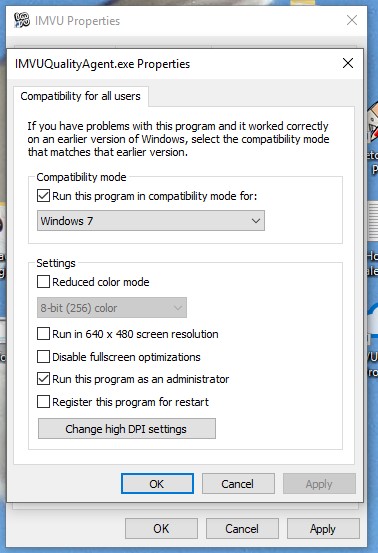
Make sure you have Administrator's Rights to the Classic Create Mode.
You can easily test this by right-clicking the IMVU Icon and "Run as Administrator".
You may also try to set the program to run this way by right-clicking the Icon,
Click on Properties and then set the "Compatibility" tab to look like this...
1 Votes
Login to post a comment