Share this article! Here's a short link you can use: im.vu/help1109
IMVU’s Creator Product Promotion Program allows Creators to grow the visibility of their products in the IMVU Shop. This tool is designed to help you reach more customers and showcase your products more prominently in the Shop. Through promotions, your products will stand out in the Shop, making it easier to attract new shoppers and expand your customer base.
Creator Product Promotion is available to all Creators on Web, Desktop, and Mobile platforms (iOS and Android). Features, pricing, and availability may change as we continue to refine the program.
How Product Promotion Works
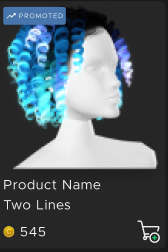
Using Creator Coins, you can promote individual products or multiple products at once in IMVU Studio. Promoted products appear in a dedicated featured section of the IMVU Shop and are also shown at a higher priority in search and filter results, and are clearly marked as “Promoted.” Product promotions will remain in effect for a specifically purchased amount of time, and promotions can be extended at any point. You will receive notifications when a promotion is ending or has finished.
Creator Coins
Creator Coins are a unique currency used exclusively for the Creator Product Promotion feature. They can be purchased from the Credits and Upgrades page or directly through IMVU Studio using only those payment methods available at the checkout page, including VCOIN. Your balance is displayed and managed in IMVU Studio. Creator Coins are non-transferable, non-giftable, and non-refundable.
Eligibility
Creator Product Promotion is available to all Creators on Web, Desktop, and Mobile platforms (iOS and Android).
How to Promote Products
Promoting your products is simple and can be done directly through IMVU Studio. Whether you want to highlight a single item or promote several at once, the process is quick and flexible. Please note that you can only promote a maximum of 50 products at the same time.
Follow the steps below to get started:
Individual Products
1. Open IMVU Studio.
2. In the "Published" section, find the item you’d like to promote.
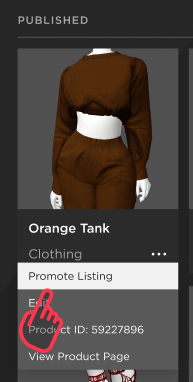
3. Click on the three dots and select Promote Listing.
4. Choose the promotion duration.
5. Click Promote Now to complete the process.
Multiple Products
1. Open IMVU Studio.
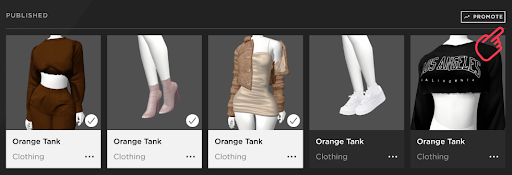
2. In the "Published" section, select the item(s) you would like to promote.
3. After making your selection(s), click on the “Promote” button in the top right corner.
4. Choose the promotion duration.
5. Click Promote Now to complete the process.
Managing Your Product Promotions
All of your active promotions will appear in the “Promoted Listings” section in IMVU Studio. Each item will display its promotion status, including the time remaining. A countdown timer will alert you when there is only one day left in your promotion.
Please note that when an item has an active promotion, it will be locked and cannot be edited. The item can only be unlocked once the promotion period ends.
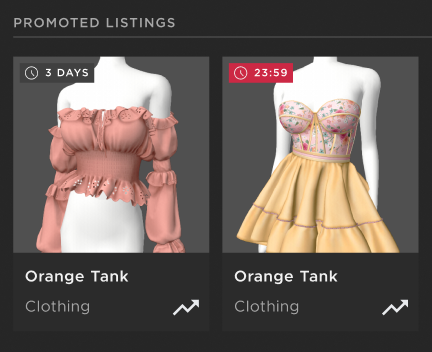
You will also have the option to extend a product’s promotion while it is still active, giving you more control over how long your items stay visible. Once a promotion ends, you can start a new one at any time to maintain visibility in IMVU Shop.
How to Extend an Active Promotion
1. Open IMVU Studio.
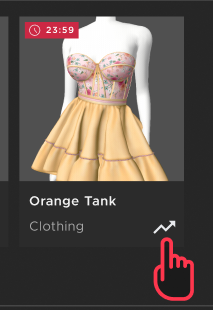
2. In the "Promoted Listings" section, find the item you would like to extend.
3. Click on the arrow icon in that listing to update its promotion.
4. Select your new promotion duration.
5. Click “Update Promotion” to complete the process.
Creator Product Promotion Report
To help you better understand how your promoted products are performing, we’ve made some helpful updates to your Creator Report (Developer Report). The report will show a running total for each product, so if you promote the same item again, your metrics will update and reflect the full activity over time.

What’s new:
Product Name - The name of the item you promoted.
Product ID - The unique PID associated with the promoted product.
Sales - The total number of sales generated during the promotion period.
Time Left - How much time remains in your active promotion.
Wish Lists - The total number of times the product was added to wish lists during the promotion period.
Adds to Cart - The total number of times the product was added to carts during the promotion period.
These improvements are just the beginning. In the weeks and months ahead, we’ll continue adding more insights and metrics to give you a richer, more comprehensive view of your promoted products and your shop’s overall performance.
Frequently Asked Questions
Can I promote multiple items at once?
Yes. Promotions can be applied individually or in bulk directly from IMVU Studio. Please note that you can promote a maximum of 50 products at the same time.
How will I know when a promotion ends?
Promotions expire once the duration time is complete. You will receive notifications when a promotion is ending or has finished, with the option to re-promote your products.
What do buyers see?
Shoppers will see promoted items higher in relevant searches and Shop categories. Each promoted product is labeled “Promoted,” so buyers always know when an item is being featured.
Will promotion replace organic discovery?
No. The Shop continues to balance organic and promoted results. Promotions provide an additional way to showcase your products to attract new shoppers and expand your customer base.
Was this article helpful?
That’s Great!
Thank you for your feedback
Sorry! We couldn't be helpful
Thank you for your feedback
Feedback sent
We appreciate your effort and will try to fix the article