on upgrading my computer to windows 11 with a screen setting of 3840 x 2160 on a 4K monitor all text & icons are so small i can barely see them
I've tried all computer & monitor settings
0 Votes
7 Comments
Sorted by
S
Sofefeposted
over 1 year ago
Hello i may be a bit late, but to fix this, you need to follow these steps: - 1: Create a shortcut for IMVU classic on your desktop. 2: Right click on the shortcut and click "Properties" 3: Navigate to the "Compatibility" tab and look for the tab "Change High DPI settings" and click it. 4: Click on "override high dpi scaling behavior and then select the box below it and click on System.
5: click OK and and then apply, and youre good to go, try opening IMVU again.
On up grading my computer to 14th gen core i7 with a RTX 4070 Graphix card & a 4K monitor all my programmes work fine with the exception of IMVU classic
the problem I'm having is that all the in game text & icons are so small i struggle to read them
I have tried all the settings on my computer to no avail I've also uninstalled & reinstalled IMVU
please can you help me
1 Votes
A
Ashleyellenposted
over 1 year ago
Hello, @Gavtrebor It been 6 days that you have not got the response yet ?
0 Votes
g
Gavtreborposted
over 1 year ago
It's been 6 day & I've heard nothing ?
could i please have a solution or at least a progress report
0 Votes
g
Gavtreborposted
over 1 year ago
I'm using IMVU Classic
1 Votes
A
Ashleyellenposted
over 1 year ago
Hello, @Gavtrebor are you using imvu next or imvu classic app or website?
on upgrading my computer to windows 11 with a screen setting of 3840 x 2160 on a 4K monitor all text & icons are so small i can barely see them
I've tried all computer & monitor settings
0 Votes
7 Comments
Sofefe posted over 1 year ago
Hello i may be a bit late, but to fix this, you need to follow these steps: -
1: Create a shortcut for IMVU classic on your desktop.
2: Right click on the shortcut and click "Properties"
3: Navigate to the "Compatibility" tab and look for the tab "Change High DPI settings" and click it.
4: Click on "override high dpi scaling behavior and then select the box below it and click on System.
5: click OK and and then apply, and youre good to go, try opening IMVU again.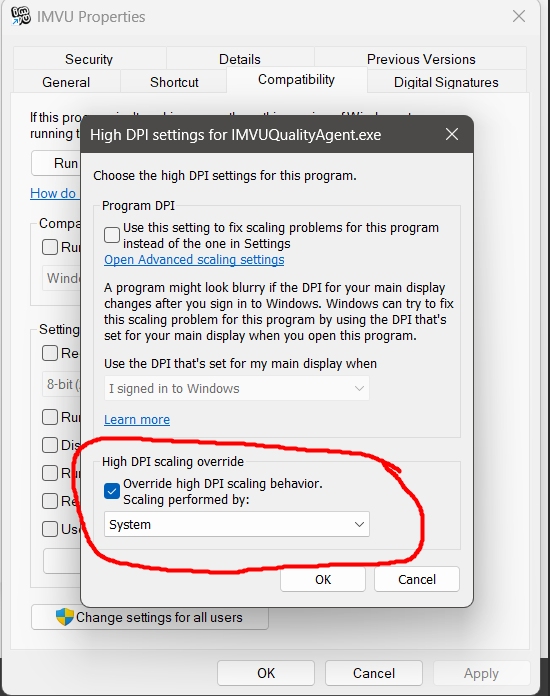
0 Votes
Ashleyellen posted over 1 year ago
Hello, @Gavtrebor
Please Contact imvu https://support.imvu.com/support/tickets/neweexperience issues you’re having .
how to contact imvu and reply http://im.vu/help1097
how to created ticket on mobile http://im.vu/help769
0 Votes
Gavtrebor posted over 1 year ago
On up grading my computer to 14th gen core i7 with a RTX 4070 Graphix card & a 4K monitor all my programmes work fine with the exception of IMVU classic
the problem I'm having is that all the in game text & icons are so small i struggle to read them
I have tried all the settings on my computer to no avail I've also uninstalled & reinstalled IMVU
please can you help me
1 Votes
Ashleyellen posted over 1 year ago
Hello, @Gavtrebor It been 6 days that you have not got the response yet ?
0 Votes
Gavtrebor posted over 1 year ago
It's been 6 day & I've heard nothing ?
could i please have a solution or at least a progress report
0 Votes
Gavtrebor posted over 1 year ago
I'm using IMVU Classic
1 Votes
Ashleyellen posted over 1 year ago
Hello, @Gavtrebor are you using imvu next or imvu classic app or website?
0 Votes
Login to post a comment