Hi all, today I hae not been able to use hardly any of my furniture, like couple poses, or couple dances, or even use my furniture to cuddle with my husband! It just started doing this last night and I've done everything I can, ive deleted the app twice and no fix, same on my laptop, if I try to interact with this couch I have, I just stand there. Same goes for when I shop for furniture in the catalog.
0 Votes
1 Comments
Da3n3ryzposted
about 1 year ago
Hi @Hiswifey9986, That sounds incredibly frustrating! It's especially annoying when a core feature of an app, like interacting with furniture and other users, suddenly stops working.
Based on what you've described, I have a very strong suspicion about what's going on. The most important clue you gave is this: it's happening on both your phone and your laptop.
When a problem persists across multiple devices and after reinstalling the app, it almost always means the issue is NOT on your end. It's not your phone, not your laptop, and not a corrupted installation. The problem is very likely with the game's servers or your specific account on their server.
Here are the most likely causes and what you can do about them:
Most Likely Cause: A Server-Side Bug or Outage
This is the number one suspect. The company that runs the game/app (it sounds like you might be describing a platform like IMVU, Avakin Life, or something similar) may have pushed an update that introduced a bug, or they could be experiencing a partial server outage that affects how avatars interact with furniture "nodes" (the spots on furniture where an avatar can sit, dance, or pose).
This would explain why:
* It started suddenly ("last night").
* It affects all similar interactions (couples poses, dances, cuddling).
* Reinstalling the app did nothing to fix it.
* The problem is identical on different devices.
What You Should Do Now
Since you've already done the standard troubleshooting, here are the next logical steps:
1. Isolate the Problem Further (for a support ticket)**
If you can't find others with the same issue, try to gather more data. This will be extremely helpful if you need to contact customer support.
Do solo poses on furniture work? Or is it only multi-person/couple interactions?
* Can you use furniture in a different room or public space?
* Can your husband try to initiate the cuddle/pose with you? Does it fail for him as well?
* Can you interact with very old, basic furniture, or is it only newer items?
2. Clear the Cache (A Long Shot, But Worth It)
Even though you reinstalled, sometimes a persistent cache file can cause issues. It's different from reinstalling.
On a PC/Laptop: Look in the app's settings for an option that says "Clear Cache" or "Clear Asset Cache."
On Mobile (Android/iOS): You can often do this through your phone's settings. Go to `Settings > Apps > [Name of the Game] > Storage` and you should see an option to "Clear Cache." Do not press "Clear Data" unless you are prepared to log in again and redownload everything.
3. Contact Official Support
If you've checked the community and it doesn't seem to be a massive, known outage, it's time to file a support ticket.
* Go to the game's official website and find their "Help" or "Support" section.
* When you write your ticket, be sure to include all the details you mentioned here:
* A clear description of the problem.
* That it started last night.
* Crucially, mention that you have tried it on two separate devices (phone and laptop) and have reinstalled the app, and the problem is the same everywhere. This tells them it's not a local issue and they need to investigate on their end.
Hi all, today I hae not been able to use hardly any of my furniture, like couple poses, or couple dances, or even use my furniture to cuddle with my husband! It just started doing this last night and I've done everything I can, ive deleted the app twice and no fix, same on my laptop, if I try to interact with this couch I have, I just stand there. Same goes for when I shop for furniture in the catalog.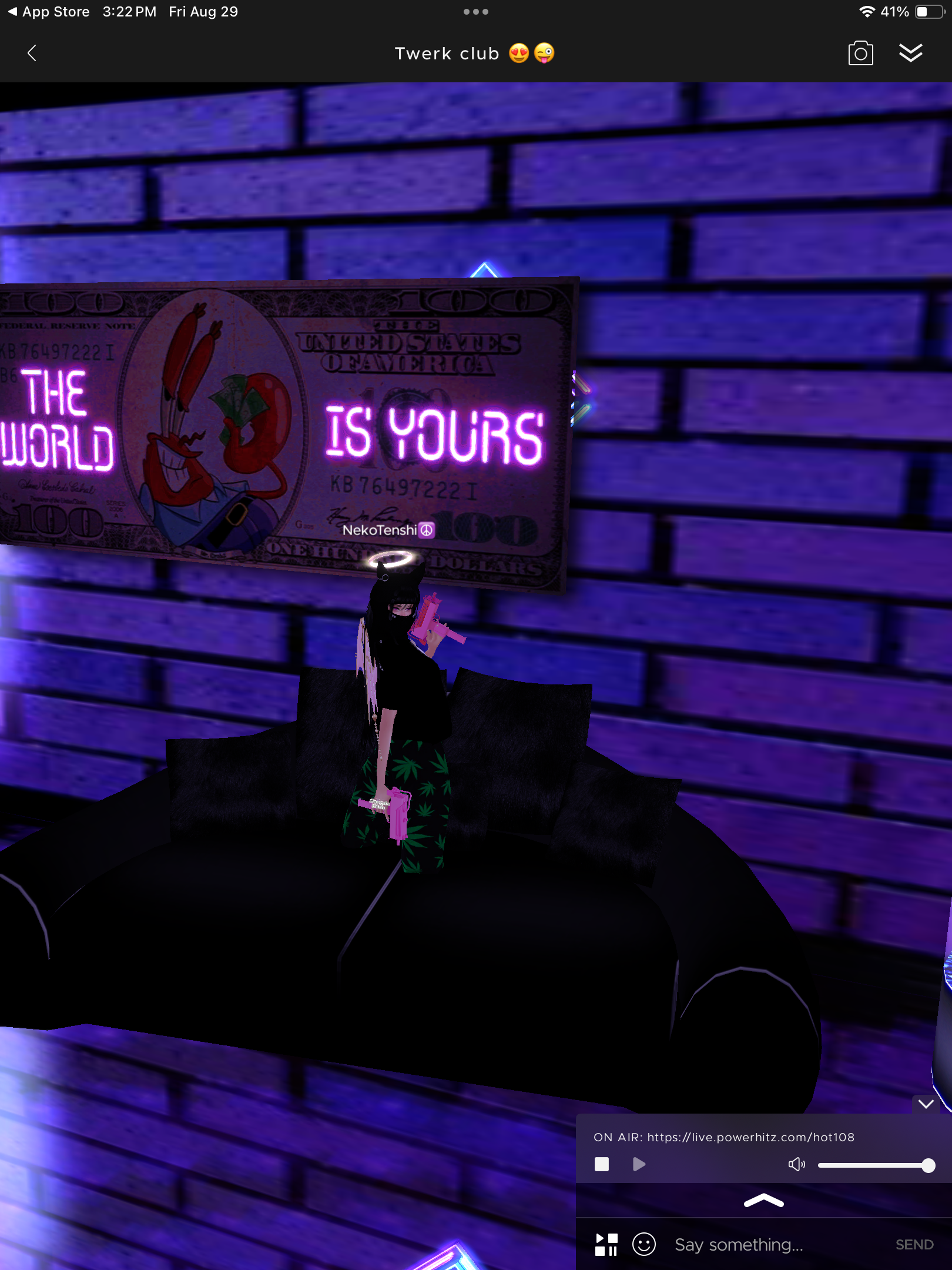
0 Votes
1 Comments
Da3n3ryz posted about 1 year ago
Hi @Hiswifey9986, That sounds incredibly frustrating! It's especially annoying when a core feature of an app, like interacting with furniture and other users, suddenly stops working.
Based on what you've described, I have a very strong suspicion about what's going on. The most important clue you gave is this: it's happening on both your phone and your laptop.
When a problem persists across multiple devices and after reinstalling the app, it almost always means the issue is NOT on your end. It's not your phone, not your laptop, and not a corrupted installation. The problem is very likely with the game's servers or your specific account on their server.
Here are the most likely causes and what you can do about them:
Most Likely Cause: A Server-Side Bug or Outage
This is the number one suspect. The company that runs the game/app (it sounds like you might be describing a platform like IMVU, Avakin Life, or something similar) may have pushed an update that introduced a bug, or they could be experiencing a partial server outage that affects how avatars interact with furniture "nodes" (the spots on furniture where an avatar can sit, dance, or pose).
This would explain why:
* It started suddenly ("last night").
* It affects all similar interactions (couples poses, dances, cuddling).
* Reinstalling the app did nothing to fix it.
* The problem is identical on different devices.
What You Should Do Now
Since you've already done the standard troubleshooting, here are the next logical steps:
1. Isolate the Problem Further (for a support ticket)**
If you can't find others with the same issue, try to gather more data. This will be extremely helpful if you need to contact customer support.
Do solo poses on furniture work? Or is it only multi-person/couple interactions?
* Can you use furniture in a different room or public space?
* Can your husband try to initiate the cuddle/pose with you? Does it fail for him as well?
* Can you interact with very old, basic furniture, or is it only newer items?
2. Clear the Cache (A Long Shot, But Worth It)
Even though you reinstalled, sometimes a persistent cache file can cause issues. It's different from reinstalling.
On a PC/Laptop: Look in the app's settings for an option that says "Clear Cache" or "Clear Asset Cache."
On Mobile (Android/iOS): You can often do this through your phone's settings. Go to `Settings > Apps > [Name of the Game] > Storage` and you should see an option to "Clear Cache." Do not press "Clear Data" unless you are prepared to log in again and redownload everything.
3. Contact Official Support
If you've checked the community and it doesn't seem to be a massive, known outage, it's time to file a support ticket.
* Go to the game's official website and find their "Help" or "Support" section.
* When you write your ticket, be sure to include all the details you mentioned here:
* A clear description of the problem.
* That it started last night.
* Crucially, mention that you have tried it on two separate devices (phone and laptop) and have reinstalled the app, and the problem is the same everywhere. This tells them it's not a local issue and they need to investigate on their end.
How to contact Customer Support:
https://support.imvu.com/support/tickets/new
Thanks
0 Votes
Login to post a comment