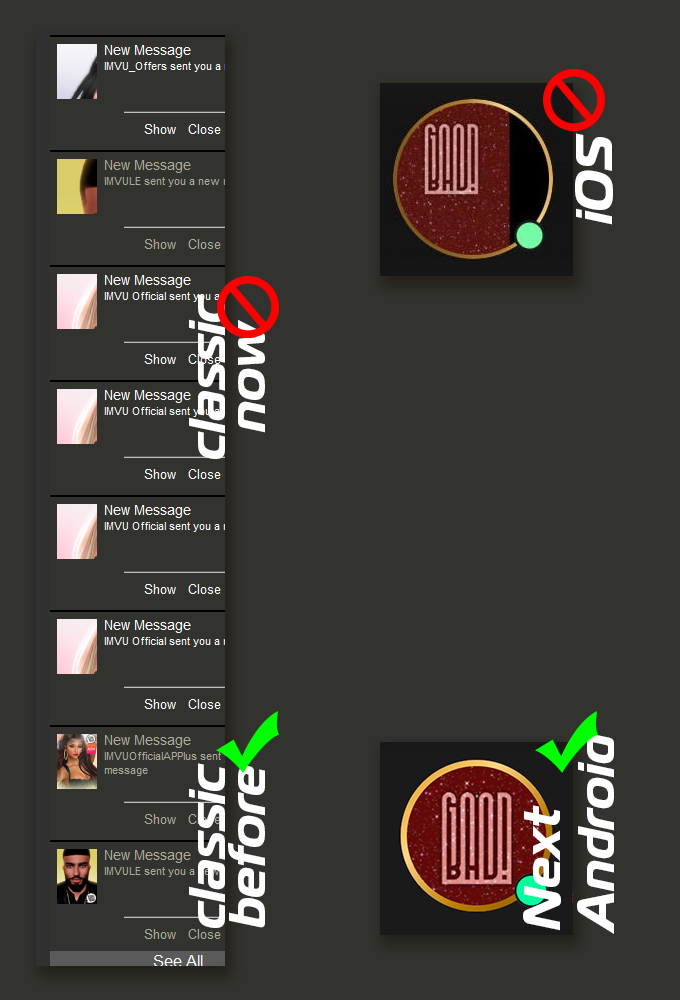
on iOS for a while (at list 3 weeks) and since yesterday on classic Avatar Images are displayed incorrectly. if on iOS issue is limited to animated gifs, on classic almost as if it's stopped resizing them to the area and displaying in original size...
on iPadOS issue with broken animated.gif avatar images is fixed. itself or update, but they all not sized proportionally correct.
on classic issue remain. images not scaled, but display in their original size.
@Petrazzenka, if the problem was with receiving and reading messages - I promise, bug report would be submitted with subject - !!! messages broken !!!, but it's not the case, so... with all due respect, please, do not add unrelated information to the bug report nor suggest something that has absolutely no impact on the problem, unless you test it and it worked. Thank you.
0 Votes
Petrazzenkaposted
7 months ago
Aside the appearance of the thumbnail pictures of the sender of the message then I am assuming that the basic notification functions still work because one can still click the Show or Close buttons.
I am confident that one can still read messages if the show button is clicked because if that wasn't possible then someone would have been complaining about that as well. Likewise with the ability to delete or report messages.
What is important is the ability to use those notification functions and not the appearance of the thumbnail pictures of the sender of the message as displayed in notifications.
I am confident that the Staff of IMVU were already aware of this tiny issue and knew it wasn't game breaking or cause for alarm.
Since the IMVU Tech workers have more important tasks then it would not surprise me if fixing this tiny issue doesn't get prioritized but I am confident they will get around to it.
There isn't any reason to let such a minor issue prevent you from enjoying IMVU.
Smiles
0 Votes
L
Lyciel666posted
7 months ago
I'm also seeing these corrupted images, despite the "None 1x scaling" setting.
on iOS for a while (at list 3 weeks) and since yesterday on classic Avatar Images are displayed incorrectly. if on iOS issue is limited to animated gifs, on classic almost as if it's stopped resizing them to the area and displaying in original size...
Attachments (1)
avatar-images.png
170 KB
0 Votes
6 Comments
BadCharm posted 6 months ago
solved with 552.4
thank you
0 Votes
Petrazzenka posted 7 months ago
BadCharm
Please don't make a mountain out of a mole hill.
0 Votes
BadCharm posted 7 months ago
on iPadOS issue with broken animated.gif avatar images is fixed. itself or update, but they all not sized proportionally correct.
on classic issue remain. images not scaled, but display in their original size.
@Petrazzenka, if the problem was with receiving and reading messages - I promise, bug report would be submitted with subject - !!! messages broken !!!, but it's not the case, so...
with all due respect, please, do not add unrelated information to the bug report nor suggest something that has absolutely no impact on the problem, unless you test it and it worked. Thank you.
0 Votes
Petrazzenka posted 7 months ago
Aside the appearance of the thumbnail pictures of the sender of the message then I am assuming that the basic notification functions still work because one can still click the Show or Close buttons.
I am confident that one can still read messages if the show button is clicked because if that wasn't possible then someone would have been complaining about that as well. Likewise with the ability to delete or report messages.
What is important is the ability to use those notification functions and not the appearance of the thumbnail pictures of the sender of the message as displayed in notifications.
I am confident that the Staff of IMVU were already aware of this tiny issue and knew it wasn't game breaking or cause for alarm.
Since the IMVU Tech workers have more important tasks then it would not surprise me if fixing this tiny issue doesn't get prioritized but I am confident they will get around to it.
There isn't any reason to let such a minor issue prevent you from enjoying IMVU.
Smiles
0 Votes
Lyciel666 posted 7 months ago
I'm also seeing these corrupted images, despite the "None 1x scaling" setting.
0 Votes
Petrazzenka posted 7 months ago
Make sure to use the correct scaling in settings
0 Votes
Login to post a comment