Share this article! Here's a short link you can use: http://im.vu/help1120
We’ve updated the Mobile Inventory and Shop to make finding and managing your items easier than ever. These changes bring a cleaner look, better search tools, and more control over how you customize your avatar.
A New Way to Browse Your Inventory
The Inventory has been redesigned to be more organized and consistent with the newest parts of the app.
Simplified Categories
- Three-Tier Navigation: Find exactly what you’re looking for with a more detailed category system that helps you drill down from general items to specific styles.
- Gender Filters: We’ve removed the separate "Male" and "Female" sections from the main menu. Now, you can simply browse a category (like "Clothing") and use the filter tool to choose which gender styles you want to see.
- Unisex Filter: Unisex is now a dedicated filter instead of appearing under both Male and Female, making it easier to find relevant items and improving overall browsing clarity.
Refreshed Item Tiles
- Clearer Names: Item names are now displayed directly on the tiles, just like in the Shop.
- More Screen Space: We’ve removed the redundant "Inventory" label from every tile so you can focus on your items.
- Easy Access:
- Tap the top of a tile (the image) to immediately put the item on.
- Tap the bottom of a tile (the name) to view more details and options for that item.
Search and Filters
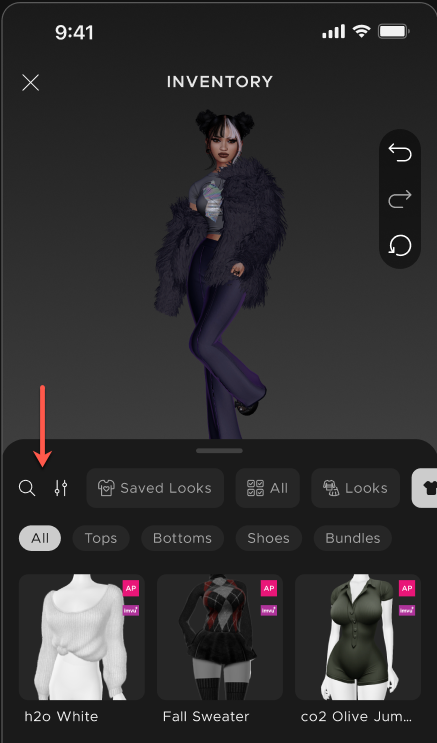
- Available on All Devices: You can now search and filter your inventory on both iOS and Android.
Shop & Fitting Room Upgrades
Trying on new looks in the Shop is now much more flexible.
Enhanced Fitting Room Controls
We’ve added options to the Fitting Room so you can experiment without fear:
- Undo: Take back your last change.
- Redo: Put back a change you just undid.
- Reset: Instantly go back to your original look.
- This option was also added to your Inventory.
- Live Updates: The icons at the bottom of your screen will update automatically as you undo or redo changes, so you always know exactly what your avatar is wearing.
New Shop Categories: Rooms and Furniture
The Rooms and Furniture shop categories, previously available only on iOS, are now available on Android too! Browse and shop for rooms, furniture, and décor right from your mobile device.
Was this article helpful?
That’s Great!
Thank you for your feedback
Sorry! We couldn't be helpful
Thank you for your feedback
Feedback sent
We appreciate your effort and will try to fix the article