Share this article! Here's a short link you can use: http://im.vu/help768
What is IMVU Hangout (Chat Now), and how do I access it?
IMVU Hangout (Chat Now) allows you to meet a new friend and interact with them. This feature is available on IMVU Classic (IMVU Client), IMVU Website, and IMVU Mobile.
On IMVU Mobile
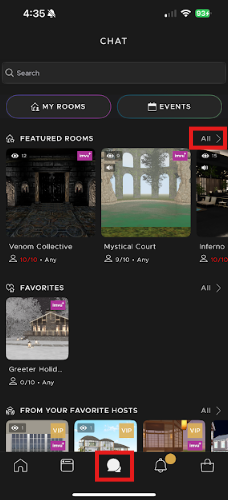
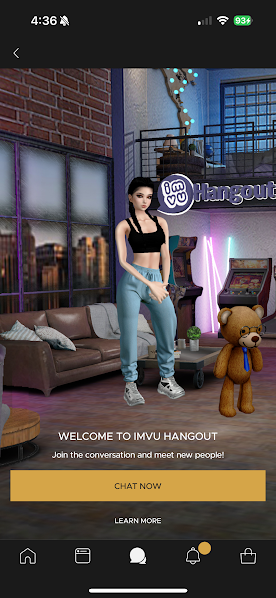
To start interacting with a random user, go to the Chat section at the bottom of your screen. From there, tap "All" in the Featured Room section. This will display all available featured rooms, including the IMVU Hangout Room. Tap "Chat Now" to begin.
On the IMVU Website
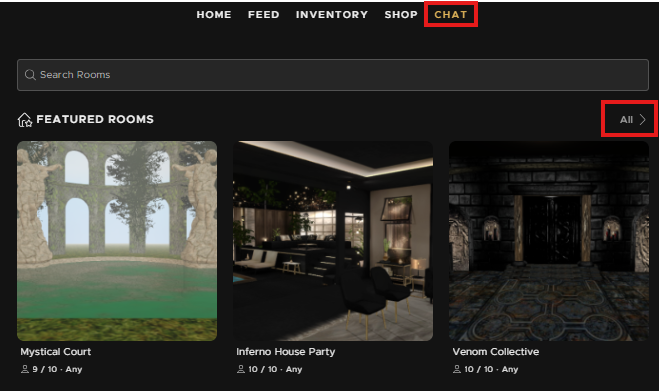
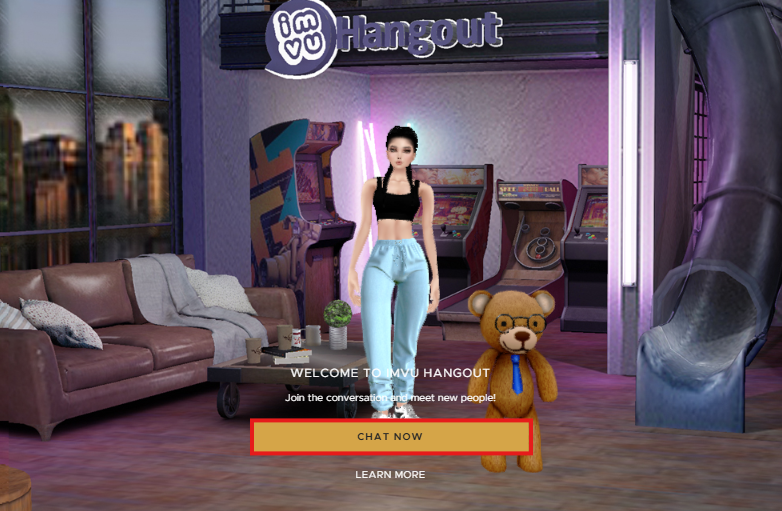
Go to the Chat tab, select "All" under the Featured Room section. On the Featured Room page, scroll down to find and select "IMVU Hangout". Click "Chat Now" to be paired with and interact with random users.
Why don't I have an IMVU Hangout (Chat Now)?
If IMVU Hangout (Chat Now) is not available for you, it may be due to one of two things:
1. You have been reported for a chat-related offense. If your Chat Now button disappears, that means you have been found to have violated a chat-related offense (spamming, offensive language and/or behavior, revealing private information, etc.). When this happens, Chat Now will be unavailable for 90 days after the date of the verdict.
2. The feature is not available for your country. Currently, IMVU has placed restrictions on Chat Now's availability for some countries. If you have never seen Chat Now, this is most likely the case.
Note that in Hangout rooms, as in all chat rooms, IMVU's Terms of Service still apply. Both users will still have full access to reporting tools while here.
Enjoy chatting!
Was this article helpful?
That’s Great!
Thank you for your feedback
Sorry! We couldn't be helpful
Thank you for your feedback
Feedback sent
We appreciate your effort and will try to fix the article